
Transformers documentation
文档问答
文档问答
文档问答(Document Question Answering),也称为文档视觉问答(Document Visual Question Answering),是一项针对文档图像所提问题提供答案的任务。支持该任务的模型输入通常由图像和问题组合而成,输出则是以自然语言表达的答案。这些模型利用多种模态,包括文本、词语位置(边界框)以及图像本身。
本指南将介绍如何:
- 在 DocVQA 数据集 上微调 LayoutLMv2。
- 使用您微调后的模型进行推理。
要查看与此任务兼容的所有架构和检查点,我们建议查阅 任务页面
LayoutLMv2 通过在令牌最终隐藏状态之上添加问答头,来预测答案起始和结束令牌的位置,从而解决文档问答任务。换言之,该问题被视为抽取式问答:给定上下文,提取出能够回答问题的信息片段。上下文来自 OCR 引擎的输出,此处使用的是 Google 的 Tesseract。
在开始之前,请确保已安装所有必要的库。LayoutLMv2 依赖于 detectron2、torchvision 和 tesseract。
pip install -q transformers datasets
pip install 'git+https://github.com/facebookresearch/detectron2.git'
pip install torchvisionsudo apt install tesseract-ocr
pip install -q pytesseract安装完所有依赖项后,请重启运行时环境。
我们鼓励您与社区分享您的模型。请登录您的 Hugging Face 账户,将其上传到 🤗 Hub。 当系统提示时,请输入您的 token 以完成登录:
>>> from huggingface_hub import notebook_login

>>> notebook_login()
让我们定义一些全局变量。
>>> model_checkpoint = "microsoft/layoutlmv2-base-uncased"
>>> batch_size = 4
加载数据
在本指南中,我们使用一小部分经过预处理的 DocVQA 数据,您可以在 🤗 Hub 上找到。如果您想使用完整的 DocVQA 数据集,可以在 DocVQA 主页 上注册并下载。如果您这样做,请查看 如何将文件加载到 🤗 数据集中 以继续本指南。
>>> from datasets import load_dataset

>>> dataset = load_dataset("nielsr/docvqa_1200_examples")
>>> dataset
DatasetDict({
    train: Dataset({
        features: ['id', 'image', 'query', 'answers', 'words', 'bounding_boxes', 'answer'],
        num_rows: 1000
    })
    test: Dataset({
        features: ['id', 'image', 'query', 'answers', 'words', 'bounding_boxes', 'answer'],
        num_rows: 200
    })
})
如你所见,数据集已经划分为训练集和测试集。查看一个随机示例,以熟悉其中的特征。
>>> dataset["train"].features以下是各个字段的具体含义:
id:示例的 idimage:一个包含文档图像的 PIL.Image.Image 对象query:问题字符串 - 以自然语言提出的问题,支持多种语言answers:由人工标注者提供的正确答案列表words和bounding_boxes:OCR 的结果,此处不会使用answer:由另一个模型匹配到的答案,此处不会使用
我们只保留英文问题,并移除 answer 特征,因为它似乎包含由另一个模型生成的预测。
我们还将采用标注者提供的答案集中的第一个答案。或者,您也可以对其进行随机采样。
>>> updated_dataset = dataset.map(lambda example: {"question": example["query"]["en"]}, remove_columns=["query"])
>>> updated_dataset = updated_dataset.map(
...     lambda example: {"answer": example["answers"][0]}, remove_columns=["answer", "answers"]
... )
请注意,本指南中使用的 LayoutLMv2 检查点是在 max_position_embeddings = 512 下训练的(您可以在 检查点的 config.json 文件中找到此信息)。
我们可以对示例进行截断,但为了避免答案可能位于大型文档末尾而被截断的情况,
这里我们将移除那些嵌入长度很可能超过 512 的少数示例。
如果您的数据集中大多数文档都很长,您可以实现滑动窗口策略 - 有关详细信息,请查看 此笔记本。
>>> updated_dataset = updated_dataset.filter(lambda x: len(x["words"]) + len(x["question"].split()) < 512)在此阶段,我们还将 OCR 功能从该数据集中移除。这些功能是针对微调另一个模型而进行 OCR 处理的结果。如果我们想使用它们,仍需进行一些处理,因为它们不符合本指南中使用的模型的输入要求。相反,我们可以使用 LayoutLMv2Processor 对原始数据同时执行 OCR 和分词。这样我们就能获得与模型预期输入相匹配的输入。如果您想手动处理图像,请查阅 LayoutLMv2 模型文档,了解该模型期望的输入格式。
>>> updated_dataset = updated_dataset.remove_columns("words")
>>> updated_dataset = updated_dataset.remove_columns("bounding_boxes")
最后,如果我们不查看一个图像示例,数据探索就不算完整。
>>> updated_dataset["train"][11]["image"]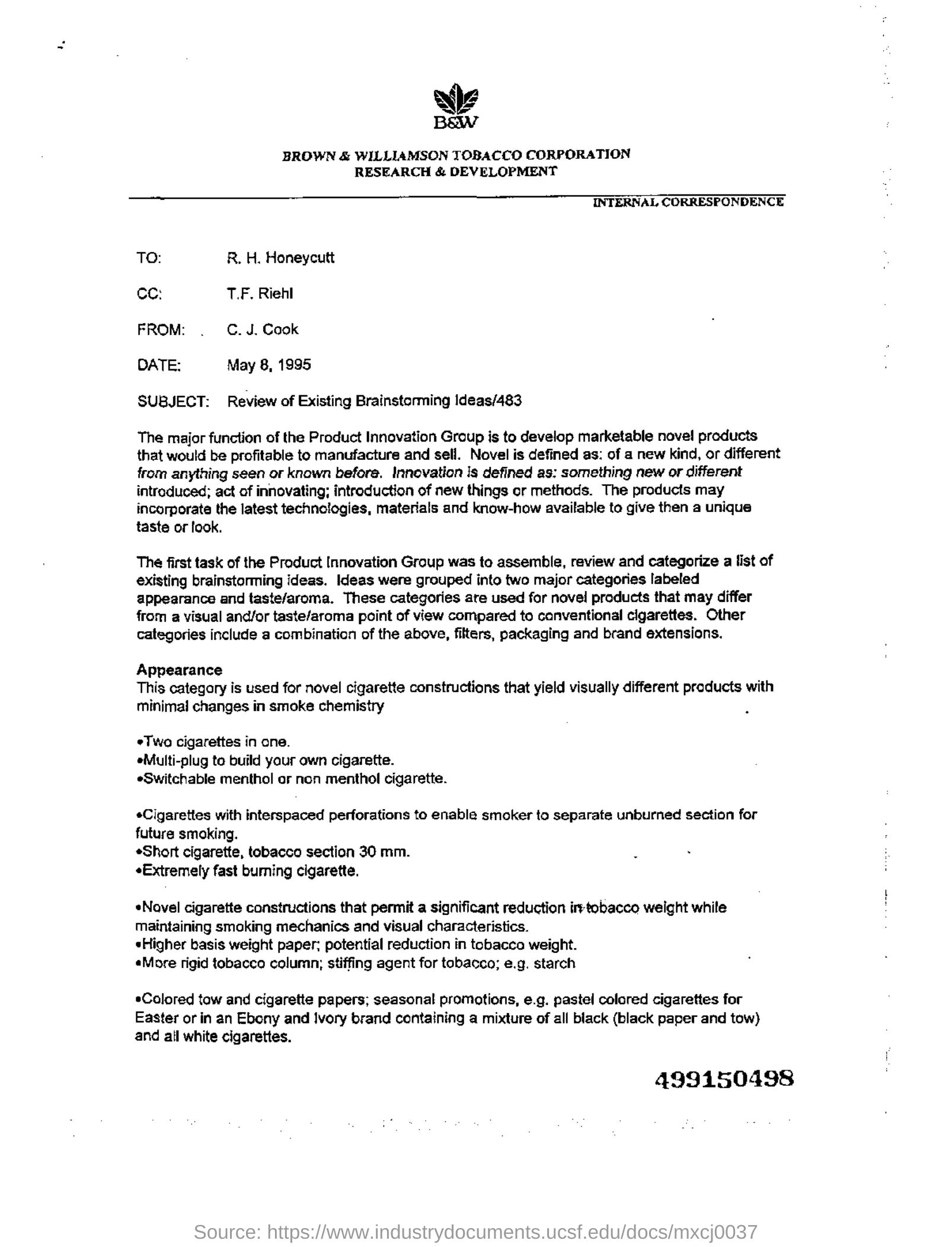
预处理数据
文档问答任务是一种多模态任务,你需要确保来自各个模态的输入都按照模型的预期进行了预处理。首先,让我们加载 LayoutLMv2Processor,它在内部组合了一个能够处理图像数据的图像处理器和一个能够编码文本数据的分词器。
>>> from transformers import AutoProcessor

>>> processor = AutoProcessor.from_pretrained(model_checkpoint)
预处理文档图像
首先,让我们借助处理器中的 image_processor 为模型准备文档图像。
默认情况下,图像处理器会将图像调整为 224x224,确保其具有正确的颜色通道顺序,
并使用 tesseract 执行 OCR 以获取单词和归一化的边界框。在本教程中,所有这些默认设置正是我们所需要的。
编写一个函数,对一批图像应用默认的图像处理,并返回 OCR 的结果。
>>> image_processor = processor.image_processor


>>> def get_ocr_words_and_boxes(examples):
...     images = [image.convert("RGB") for image in examples["image"]]
...     encoded_inputs = image_processor(images)

...     examples["image"] = encoded_inputs.pixel_values
...     examples["words"] = encoded_inputs.words
...     examples["boxes"] = encoded_inputs.boxes

...     return examples
要以快速的方式将此预处理应用于整个数据集,请使用 map。
>>> dataset_with_ocr = updated_dataset.map(get_ocr_words_and_boxes, batched=True, batch_size=2)预处理文本数据
对图像应用 OCR 后,我们需要对数据集的文本部分进行编码,以便为模型做准备。
这包括将上一步中获得的单词和边界框转换为 token 级别的 input_ids、attention_mask、token_type_ids 和 bbox。对于文本预处理,我们需要使用处理器中的 tokenizer。
>>> tokenizer = processor.tokenizer在上述预处理的基础上,我们还需要为模型添加标签。对于 🤗 Transformers 中的 xxxForQuestionAnswering 模型,标签由 start_positions 和 end_positions 组成,分别指示答案起始和结束位置对应的 token。
让我们从这一点开始。定义一个辅助函数,用于在较大的列表(即单词列表)中查找一个子列表(即按单词拆分的答案)。
This function will take two lists as input, words_list and answer_list. It will then iterate over the words_list and check
if the current word in the words_list (words_list[i]) is equal to the first word of answer_list (answer_list[0]) and if
the sublist of words_list starting from the current word and of the same length as answer_list is equal to answer_list.
If this condition is true, it means that a match has been found, and the function will record the match, its starting index (idx),
and its ending index (idx + len(answer_list) - 1). If more than one match was found, the function will return only the first one.
If no match is found, the function returns (None, 0, and 0).
>>> def subfinder(words_list, answer_list):
...     matches = []
...     start_indices = []
...     end_indices = []
...     for idx, i in enumerate(range(len(words_list))):
...         if words_list[i] == answer_list[0] and words_list[i : i + len(answer_list)] == answer_list:
...             matches.append(answer_list)
...             start_indices.append(idx)
...             end_indices.append(idx + len(answer_list) - 1)
...     if matches:
...         return matches[0], start_indices[0], end_indices[0]
...     else:
...         return None, 0, 0
为了说明该函数如何找到答案的位置,让我们在一个示例中使用它:
>>> example = dataset_with_ocr["train"][1]
>>> words = [word.lower() for word in example["words"]]
>>> match, word_idx_start, word_idx_end = subfinder(words, example["answer"].lower().split())
>>> print("Question: ", example["question"])
>>> print("Words:", words)
>>> print("Answer: ", example["answer"])
>>> print("start_index", word_idx_start)
>>> print("end_index", word_idx_end)
Question:  Who is in  cc in this letter?
Words: ['wie', 'baw', 'brown', '&', 'williamson', 'tobacco', 'corporation', 'research', '&', 'development', 'internal', 'correspondence', 'to:', 'r.', 'h.', 'honeycutt', 'ce:', 't.f.', 'riehl', 'from:', '.', 'c.j.', 'cook', 'date:', 'may', '8,', '1995', 'subject:', 'review', 'of', 'existing', 'brainstorming', 'ideas/483', 'the', 'major', 'function', 'of', 'the', 'product', 'innovation', 'graup', 'is', 'to', 'develop', 'marketable', 'nove!', 'products', 'that', 'would', 'be', 'profitable', 'to', 'manufacture', 'and', 'sell.', 'novel', 'is', 'defined', 'as:', 'of', 'a', 'new', 'kind,', 'or', 'different', 'from', 'anything', 'seen', 'or', 'known', 'before.', 'innovation', 'is', 'defined', 'as:', 'something', 'new', 'or', 'different', 'introduced;', 'act', 'of', 'innovating;', 'introduction', 'of', 'new', 'things', 'or', 'methods.', 'the', 'products', 'may', 'incorporate', 'the', 'latest', 'technologies,', 'materials', 'and', 'know-how', 'available', 'to', 'give', 'then', 'a', 'unique', 'taste', 'or', 'look.', 'the', 'first', 'task', 'of', 'the', 'product', 'innovation', 'group', 'was', 'to', 'assemble,', 'review', 'and', 'categorize', 'a', 'list', 'of', 'existing', 'brainstorming', 'ideas.', 'ideas', 'were', 'grouped', 'into', 'two', 'major', 'categories', 'labeled', 'appearance', 'and', 'taste/aroma.', 'these', 'categories', 'are', 'used', 'for', 'novel', 'products', 'that', 'may', 'differ', 'from', 'a', 'visual', 'and/or', 'taste/aroma', 'point', 'of', 'view', 'compared', 'to', 'canventional', 'cigarettes.', 'other', 'categories', 'include', 'a', 'combination', 'of', 'the', 'above,', 'filters,', 'packaging', 'and', 'brand', 'extensions.', 'appearance', 'this', 'category', 'is', 'used', 'for', 'novel', 'cigarette', 'constructions', 'that', 'yield', 'visually', 'different', 'products', 'with', 'minimal', 'changes', 'in', 'smoke', 'chemistry', 'two', 'cigarettes', 'in', 'cne.', 'emulti-plug', 'te', 'build', 'yaur', 'awn', 'cigarette.', 'eswitchable', 'menthol', 'or', 'non', 'menthol', 'cigarette.', '*cigarettes', 'with', 'interspaced', 'perforations', 'to', 'enable', 'smoker', 'to', 'separate', 'unburned', 'section', 'for', 'future', 'smoking.', '«short', 'cigarette,', 'tobacco', 'section', '30', 'mm.', '«extremely', 'fast', 'buming', 'cigarette.', '«novel', 'cigarette', 'constructions', 'that', 'permit', 'a', 'significant', 'reduction', 'iretobacco', 'weight', 'while', 'maintaining', 'smoking', 'mechanics', 'and', 'visual', 'characteristics.', 'higher', 'basis', 'weight', 'paper:', 'potential', 'reduction', 'in', 'tobacco', 'weight.', '«more', 'rigid', 'tobacco', 'column;', 'stiffing', 'agent', 'for', 'tobacco;', 'e.g.', 'starch', '*colored', 'tow', 'and', 'cigarette', 'papers;', 'seasonal', 'promotions,', 'e.g.', 'pastel', 'colored', 'cigarettes', 'for', 'easter', 'or', 'in', 'an', 'ebony', 'and', 'ivory', 'brand', 'containing', 'a', 'mixture', 'of', 'all', 'black', '(black', 'paper', 'and', 'tow)', 'and', 'ail', 'white', 'cigarettes.', '499150498']
Answer:  T.F. Riehl
start_index 17
end_index 18
不过,一旦示例被编码,它们将呈现如下形式:
>>> encoding = tokenizer(example["question"], example["words"], example["boxes"])
>>> tokenizer.decode(encoding["input_ids"])
[CLS] who is in cc in this letter? [SEP] wie baw brown & williamson tobacco corporation research & development ...
我们需要在编码后的输入中找到答案的位置。
token_type_ids告诉我们哪些 token 属于问题,哪些属于文档的词语。tokenizer.cls_token_id有助于找到输入开头的特殊标记。word_ids有助于将原始words中找到的答案与完整编码输入中的同一答案进行匹配,并确定该答案在编码输入中的起始/结束位置。
基于此,让我们创建一个函数来对数据集中的示例批次进行编码:
>>> def encode_dataset(examples, max_length=512):
...     questions = examples["question"]
...     words = examples["words"]
...     boxes = examples["boxes"]
...     answers = examples["answer"]

...     # encode the batch of examples and initialize the start_positions and end_positions
...     encoding = tokenizer(questions, words, boxes, max_length=max_length, padding="max_length", truncation=True)
...     start_positions = []
...     end_positions = []

...     # loop through the examples in the batch
...     for i in range(len(questions)):
...         cls_index = encoding["input_ids"][i].index(tokenizer.cls_token_id)

...         # find the position of the answer in example's words
...         words_example = [word.lower() for word in words[i]]
...         answer = answers[i]
...         match, word_idx_start, word_idx_end = subfinder(words_example, answer.lower().split())

...         if match:
...             # if match is found, use `token_type_ids` to find where words start in the encoding
...             token_type_ids = encoding["token_type_ids"][i]
...             token_start_index = 0
...             while token_type_ids[token_start_index] != 1:
...                 token_start_index += 1

...             token_end_index = len(encoding["input_ids"][i]) - 1
...             while token_type_ids[token_end_index] != 1:
...                 token_end_index -= 1

...             word_ids = encoding.word_ids(i)[token_start_index : token_end_index + 1]
...             start_position = cls_index
...             end_position = cls_index

...             # loop over word_ids and increase `token_start_index` until it matches the answer position in words
...             # once it matches, save the `token_start_index` as the `start_position` of the answer in the encoding
...             for id in word_ids:
...                 if id == word_idx_start:
...                     start_position = token_start_index
...                 else:
...                     token_start_index += 1

...             # similarly loop over `word_ids` starting from the end to find the `end_position` of the answer
...             for id in word_ids[::-1]:
...                 if id == word_idx_end:
...                     end_position = token_end_index
...                 else:
...                     token_end_index -= 1

...             start_positions.append(start_position)
...             end_positions.append(end_position)

...         else:
...             start_positions.append(cls_index)
...             end_positions.append(cls_index)

...     encoding["image"] = examples["image"]
...     encoding["start_positions"] = start_positions
...     encoding["end_positions"] = end_positions

...     return encoding
现在我们已经有了这个预处理函数,就可以对整个数据集进行编码:
>>> encoded_train_dataset = dataset_with_ocr["train"].map(
...     encode_dataset, batched=True, batch_size=2, remove_columns=dataset_with_ocr["train"].column_names
... )
>>> encoded_test_dataset = dataset_with_ocr["test"].map(
...     encode_dataset, batched=True, batch_size=2, remove_columns=dataset_with_ocr["test"].column_names
... )
让我们看看编码后的数据集的特征是什么样的:
>>> encoded_train_dataset.features
{'image': Sequence(feature=Sequence(feature=Sequence(feature=Value(dtype='uint8', id=None), length=-1, id=None), length=-1, id=None), length=-1, id=None),
 'input_ids': Sequence(feature=Value(dtype='int32', id=None), length=-1, id=None),
 'token_type_ids': Sequence(feature=Value(dtype='int8', id=None), length=-1, id=None),
 'attention_mask': Sequence(feature=Value(dtype='int8', id=None), length=-1, id=None),
 'bbox': Sequence(feature=Sequence(feature=Value(dtype='int64', id=None), length=-1, id=None), length=-1, id=None),
 'start_positions': Value(dtype='int64', id=None),
 'end_positions': Value(dtype='int64', id=None)}
评估
文档问答的评估需要大量的后处理工作。为了避免占用您过多的时间,本指南将跳过评估步骤。Trainer 在训练过程中仍会计算评估损失,因此您不会完全不了解模型的性能。抽取式问答通常使用 F1/精确匹配进行评估。如果您想自行实现,可以参考 Hugging Face 课程中的问答章节以获取灵感。
训练
恭喜!您已经顺利完成了本指南中最具挑战性的部分,现在可以开始训练自己的模型了。 训练包含以下步骤:
- 使用与预处理中相同的检查点,通过 AutoModelForDocumentQuestionAnswering 加载模型。
- 在 TrainingArguments 中定义你的训练超参数。
- 定义一个函数来将示例进行批处理,这里使用 DefaultDataCollator 即可满足需求
- 将训练参数与模型、数据集和数据整理器一起传递给 Trainer。
- 调用 train() 来微调你的模型。
>>> from transformers import AutoModelForDocumentQuestionAnswering

>>> model = AutoModelForDocumentQuestionAnswering.from_pretrained(model_checkpoint)
在 TrainingArguments 中,使用 output_dir 指定模型的保存位置,并根据需要配置超参数。
如果您希望与社区共享模型,请将 push_to_hub 设置为 True(上传模型前必须登录 Hugging Face)。
在这种情况下,output_dir 也将作为推送模型检查点所在仓库的名称。
>>> from transformers import TrainingArguments

>>> # REPLACE THIS WITH YOUR REPO ID
>>> repo_id = "MariaK/layoutlmv2-base-uncased_finetuned_docvqa"

>>> training_args = TrainingArguments(
...     output_dir=repo_id,
...     per_device_train_batch_size=4,
...     num_train_epochs=20,
...     save_steps=200,
...     logging_steps=50,
...     eval_strategy="steps",
...     learning_rate=5e-5,
...     save_total_limit=2,
...     remove_unused_columns=False,
...     push_to_hub=True,
... )
定义一个简单的数据整理器(data collator),用于将示例批量组合在一起。
>>> from transformers import DefaultDataCollator

>>> data_collator = DefaultDataCollator()
最后,将所有内容整合起来,并调用 train():
>>> from transformers import Trainer

>>> trainer = Trainer(
...     model=model,
...     args=training_args,
...     data_collator=data_collator,
...     train_dataset=encoded_train_dataset,
...     eval_dataset=encoded_test_dataset,
...     processing_class=processor,
... )

>>> trainer.train()
要将最终模型添加到 🤗 Hub,请创建一个模型卡片并调用 push_to_hub:
>>> trainer.create_model_card()
>>> trainer.push_to_hub()
推理
现在,您已经微调了 LayoutLMv2 模型并将其上传到 🤗 Hub,就可以使用它进行推理。尝试使用微调后的模型进行推理的最简单方法是将其用于 Pipeline。
我们来看一个例子:
>>> example = dataset["test"][2]
>>> question = example["query"]["en"]
>>> image = example["image"]
>>> print(question)
>>> print(example["answers"])
'Who is ‘presiding’ TRRF GENERAL SESSION (PART 1)?'
['TRRF Vice President', 'lee a. waller']
接下来,使用您的模型实例化一个用于文档问答的 pipeline,并将图像 + 问题的组合传入其中。
>>> from transformers import pipeline

>>> qa_pipeline = pipeline("document-question-answering", model="MariaK/layoutlmv2-base-uncased_finetuned_docvqa")
>>> qa_pipeline(image, question)
[{'score': 0.9949808120727539,
  'answer': 'Lee A. Waller',
  'start': 55,
  'end': 57}]
您也可以手动复现 pipeline 的结果:
- 获取一张图像和一个问题,并使用来自您模型的处理器为模型准备它们。
- 将结果或预处理结果通过模型进行前向传播。
- 模型返回
start_logits和end_logits,分别指示答案起始和结束位置的 token。两者的形状均为 (batch_size, sequence_length)。 - 对
start_logits和end_logits的最后一个维度执行 argmax,以获取预测的start_idx和end_idx。 - 使用分词器解码答案。
>>> import torch
>>> from transformers import AutoProcessor
>>> from transformers import AutoModelForDocumentQuestionAnswering

>>> processor = AutoProcessor.from_pretrained("MariaK/layoutlmv2-base-uncased_finetuned_docvqa")
>>> model = AutoModelForDocumentQuestionAnswering.from_pretrained("MariaK/layoutlmv2-base-uncased_finetuned_docvqa")

>>> with torch.no_grad():
...     encoding = processor(image.convert("RGB"), question, return_tensors="pt")
...     outputs = model(**encoding)
...     start_logits = outputs.start_logits
...     end_logits = outputs.end_logits
...     predicted_start_idx = start_logits.argmax(-1).item()
...     predicted_end_idx = end_logits.argmax(-1).item()

>>> processor.tokenizer.decode(encoding.input_ids.squeeze()[predicted_start_idx : predicted_end_idx + 1])
'lee a. waller'